Bookmarkme vs Raindrop.io: How the Two Compare
Raindrop.io is one of the best-known bookmark managers. It has been around since 2013, runs on nearly every platform and has a generous free plan. Bookmarkme is newer and smaller. We make Bookmarkme, so read this as one side's account. We have tried to write the comparison we would want to read ourselves: what each product does, where Raindrop.io is ahead, and where Bookmarkme does something different.
Everything said about Raindrop.io here comes from its own pricing and help pages, read on 25 November 2026. Products change, so check Raindrop.io's pricing page before you decide.
The short version
Choose Raindrop.io if you want unlimited bookmarks for free, apps on your phone, an extension for Firefox or Safari, or a collection that several people can edit.
Choose Bookmarkme if you work in Chrome, want every bookmark to carry a screenshot and an AI summary with key points, want reminders without paying, or need to put a password on a collection you share.
Side by side
| Feature | Bookmarkme | Raindrop.io |
|---|---|---|
| Free plan | Up to 500 bookmarks and 5 collections | Unlimited bookmarks, collections and devices |
| Paid plan | Pro: $3 a month billed yearly, or $5 month to month | Pro: listed at $3 a month, less if paid yearly |
| Browser extensions | Chrome and Chromium browsers | Chrome, Firefox, Safari and Edge |
| Apps | Web app in any browser | Windows, Mac, iPhone, iPad and Android |
| Views | Grid, masonry, list, headlines | Grid, masonry, list, headlines |
| Nested collections and tags | Yes | Yes |
| Highlights | Pro | Free, with notes on highlights on Pro |
| Search | Titles, addresses, notes and tags | Adds the full text of pages, PDFs and YouTube videos on Pro |
| AI | Pro: summaries, suggested tags, Ask your bookmarks | Pro: AI Assistant and AI Suggestions |
| Reminders | Free | Pro |
| Public sharing | A link per collection, optional password | A public page per collection, no password |
| Editing a collection together | No | Yes, with member and read-only roles |
| Saved copies of pages | Pro, for the pages you choose | Pro, automatic for every page |
| Duplicates | Pro: a warning when you save | Pro: a duplicate finder and a broken link finder |
| Export | Not yet | HTML, CSV and TXT |
| Integrations and API | No | Yes |
Price
On a yearly plan the two are close in price. Bookmarkme Pro is $36 a year, which is $3 a month. Raindrop.io lists Pro at $3 a month, with about 20% off if you pay yearly. Paying month to month, Bookmarkme Pro is $5.
Both have a free plan, and both refund a paid plan within 30 days. Bookmarkme Pro also starts with a 14-day free trial.
Where Raindrop.io is ahead
The free plan
Raindrop.io's free plan has no limit on bookmarks, collections or devices. Bookmarkme's stops at 500 bookmarks and 5 collections, and after that you need Pro. If you have thousands of bookmarks and don't want to pay, that decides it.
Platforms
Raindrop.io has extensions for Chrome, Firefox, Safari and Edge, and apps for Windows, Mac, iPhone, iPad and Android. Bookmarkme has one extension, for Chrome and the browsers built on it such as Edge, Brave, Vivaldi and Arc, plus a web app that works in any browser, including on a phone. It has no native mobile apps.
Search, archives and clean-up
On Pro, Raindrop.io searches the full text of every saved page, PDF and YouTube video, keeps a copy of each page automatically, backs up your account daily, and finds duplicates and broken links across your library. Bookmarkme searches titles, addresses, notes and tags. On Pro it saves a copy of a page when you ask it to, and it warns you about a duplicate at the moment you save, but it doesn't check the bookmarks you already have.
Working with other people
In Raindrop.io you can invite people to a collection and let them add and edit bookmarks. A Bookmarkme collection has one owner. You can share it for viewing, and that is all for now.
Getting your bookmarks out
Raindrop.io exports your whole account, one collection or a selection of bookmarks as HTML, CSV or TXT. Bookmarkme imports bookmarks from any browser but doesn't have an export yet.
Where Bookmarkme is different
A screenshot and a summary on every bookmark
Bookmarkme captures a screenshot of each page you save and uses it as the card, so a collection looks like the pages inside it. You can replace any preview by uploading or pasting an image of your own.
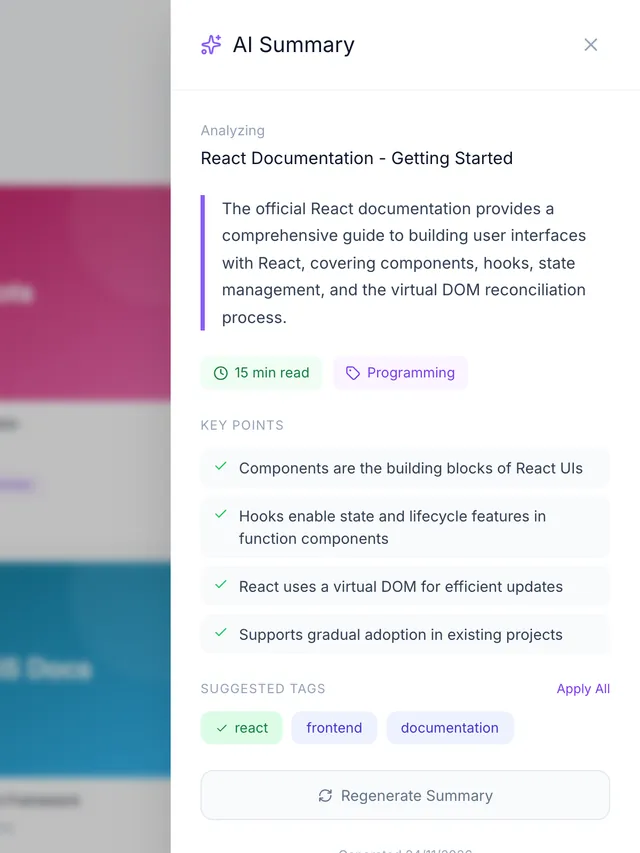
On Pro, Summarize gives a bookmark a short summary, three key points, a category, a reading time and suggested tags. Ask your bookmarks answers a question from what you've saved and links to the bookmarks it used. Raindrop.io's Pro plan has an AI Assistant and tag suggestions of its own, so if AI is what you're choosing on, try both.
Reminders on the free plan
Set a date on any bookmark and Bookmarkme emails you when it's due, with a browser notification as well if you turn that on. This is part of the Free plan. Raindrop.io includes reminders in Pro.
A password on a shared collection
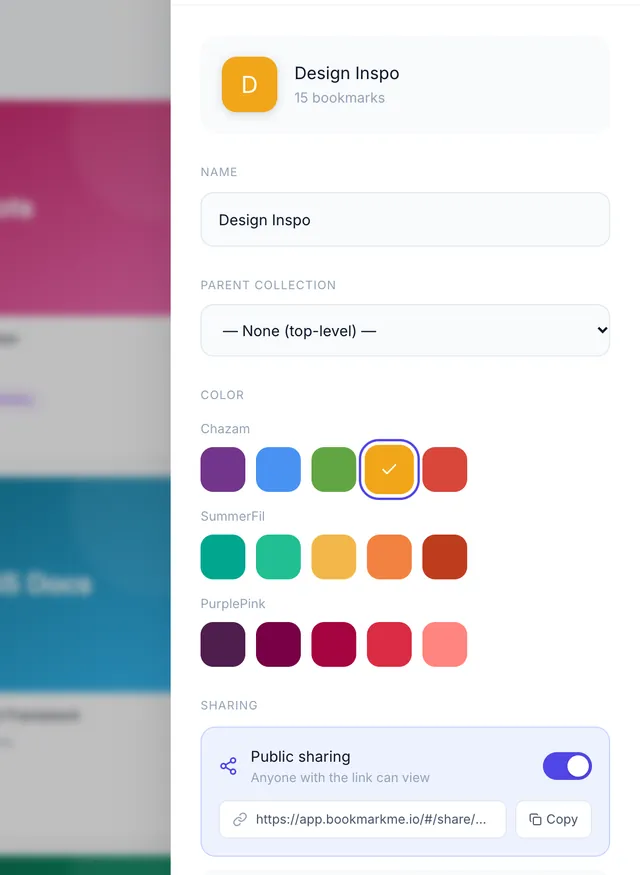
Both products can publish a collection as a page that anyone with the link can open. Bookmarkme lets you add a password to that link. Raindrop.io's help page says its public pages can't be password-protected, and suggests inviting specific people as members instead.
Less to learn
Raindrop.io does a great deal: file uploads, integrations, an API, collaboration. Bookmarkme is a smaller tool with one job, which is keeping web pages where you can see them and find them again. Some people will count that against it, and for others it's the reason to pick it.
Moving from one to the other
To try Bookmarkme with your Raindrop.io bookmarks, open a collection in Raindrop.io, click Export and choose HTML. For everything at once, go to Settings, then Backups, and click Create new. Raindrop.io emails you when the file is ready. Then follow the import guide.
Be aware of what the import carries over. It reads each bookmark's title and address and puts them all in one collection. Tags, notes and highlights stay behind, and on the Free plan it stops at 500 bookmarks.
Which to choose
If you want one bookmark manager on every device you own, free, with room for a very large library, Raindrop.io is the stronger choice, and we'd say the same to a friend.
If your browsing happens in Chrome and you want a visual library with summaries, free reminders and password-protected sharing, try Bookmarkme. The Free plan covers 500 bookmarks, and Pro has a 14-day free trial.