The Best Bookmark Managers for Chrome: Seven Options Compared
There are dozens of bookmark managers that work in Chrome. This guide doesn't rank them. It describes seven, says who each one suits and what it costs, and leaves the choice to you.
Two things to know first. We make Bookmarkme, which is one of the seven, so weigh our description of it accordingly. And the details about the other products come from each company's own website, read on 25 November 2026. We haven't run them side by side in a test, and prices change, so check the product's site before you pay for anything.
The seven side by side
| Bookmark manager | Suits | Free option | Paid price |
|---|---|---|---|
| Chrome's built-in manager | A few dozen bookmarks | Free | None |
| Raindrop.io | One library on every device | Unlimited bookmarks | Pro listed at $3 a month |
| Toby | Saving and reopening sets of tabs | Up to 60 saved tabs | $4.50 a member a month, billed yearly |
| Karakeep | Running it yourself, with AI tagging | Self-hosted, or 50 bookmarks in the cloud | $4 a month or $40 a year |
| Linkwarden | Keeping a full copy of every page | Self-hosted, or a 14-day cloud trial | $3 a user a month, billed yearly |
| Pinboard | Speed and plain text | No | $27 a year |
| Bookmarkme | A visual library with AI summaries | Up to 500 bookmarks | $3 a month billed yearly, or $5 month to month |
Chrome's built-in bookmark manager
It's already installed, it syncs through your Google account, and the bookmarks bar is the quickest way to reach the ten sites you use every day. For a few dozen bookmarks you don't need anything else.
It has folders but no tags, its search covers titles and addresses only, and every bookmark is a line of text with no preview. We compared it with an extension in more detail in Chrome's built-in bookmarks vs extensions.
Raindrop.io
Raindrop.io is the broadest of the seven. Its free plan has unlimited bookmarks, collections and devices, and it has extensions for Chrome, Firefox, Safari and Edge as well as apps for Windows, Mac, iPhone, iPad and Android. Collections can be published as public pages or edited by several people.
The Pro plan, listed at $3 a month, adds full-text search of saved pages, permanent copies, an AI assistant, reminders, daily backups and tools that find duplicates and broken links. If you want one bookmark manager everywhere and don't want to pay, start here. We wrote a fuller comparison of Bookmarkme and Raindrop.io.
Toby
Toby is built around tabs more than bookmarks. You save the tabs you have open into a collection with one click, group collections into a Space for each project, and reopen a set when you return to that work. A collection can be shared as a link, and a team can work in a shared Space.
The free plan holds up to 60 saved tabs. The Productivity plan is $4.50 a member a month, billed yearly. It removes that limit and adds advanced search and duplicate removal. Toby suits people whose problem is forty open tabs. If you want a long-term library with previews or saved copies of pages, the other tools here are aimed more squarely at that.
Karakeep
Karakeep is open source and can run on your own server, where it's free with no limits. It saves links, notes, images and PDFs, tags them automatically with AI, and searches the full text of everything, including text inside images. It has a reader view with highlights, rules that file new bookmarks for you, and apps for iPhone and Android alongside extensions for Chrome, Firefox and Safari.
If you'd rather not run a server, the hosted version is free for 50 bookmarks, and $4 a month or $40 a year for up to 50,000. Karakeep suits people who want control of their data and are comfortable with Docker.
Linkwarden
Linkwarden is also open source and can be self-hosted. Its focus is preservation: it saves a full copy of every page in several formats, so a bookmark still works after the original page has gone. It adds a reader view with highlights and annotations, optional AI tagging, and collections that several people can contribute to.
The hosted version is $3 a user a month on a yearly plan, with a 14-day free trial and room for 30,000 links per user. It has extensions for Chrome, Safari and Firefox and apps for iPhone and Android. Choose it if losing pages to dead links is what worries you, or if a team needs a shared archive.
Pinboard
Pinboard has been running since 2009 and has kept the same plain design: a text-based list with tags, descriptions and a read-later flag. The site says it stays fast with tens of thousands of bookmarks and carries no ads, trackers or third-party scripts, and you can make every bookmark private by default.
It costs $27 a year, or $44 a year for an account that also stores a copy of each page. You save from Chrome with a browser extension or a bookmarklet. Pinboard suits people who want a quick, private list and don't need previews.
Bookmarkme
Bookmarkme is ours. It's a visual bookmark manager: every page you save gets a screenshot, and you browse a collection as a grid of those screenshots instead of a list of titles. Collections can be nested and colour-coded, bookmarks take tags and notes, and you can share a collection with a link and put a password on it.
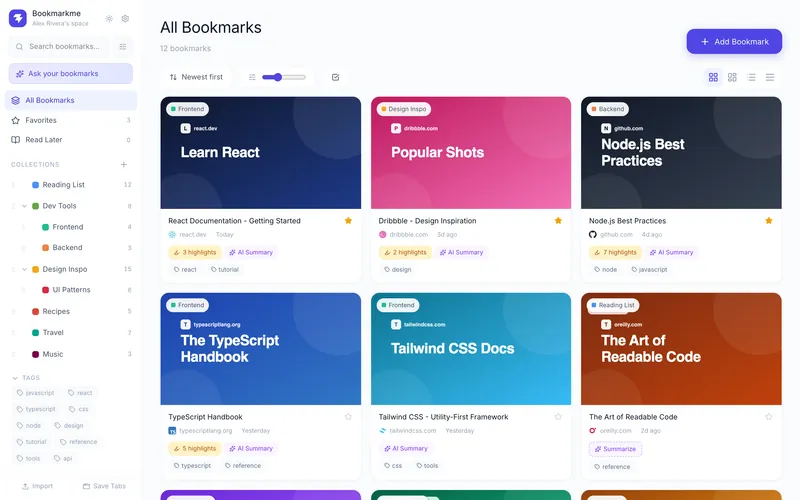
The Free plan covers up to 500 bookmarks and 5 collections, and includes reminders by email. Pro is $3 a month billed yearly, or $5 month to month. It removes the limits and adds AI summaries with key points, suggested tags, highlights and Ask your bookmarks, which answers a question from what you've saved.
Its limits are worth knowing. The extension is for Chrome and the browsers built on it, such as Edge, Brave, Vivaldi and Arc. In other browsers and on a phone you use the web app, and there are no native mobile apps. If you need more than 500 bookmarks without paying, Raindrop.io or a self-hosted tool is the better fit.
How to choose
- A few dozen bookmarks, all in Chrome: stay with the built-in manager
- Free, unlimited and on every device: Raindrop.io
- Too many open tabs: Toby
- Your own server and your own data: Karakeep or Linkwarden
- A fast, private list with no decoration: Pinboard
- Recognising pages by sight, with summaries, reminders and password-protected sharing: Bookmarkme
Whichever you pick, export your Chrome bookmarks to a file first. That file is the standard way to bring bookmarks into a new tool, and it's a backup if you change your mind.